Typing.com is the free one.
The one schools use. The one that offers lessons, tests, games, digital literacy, and coding basics — all without charging a dime. With over a million teachers and hundreds of millions of learners, it's one of the biggest typing platforms on the planet.
Then there's TypingBattles. It doesn't care about digital literacy or coding. It doesn't have a curriculum. It just wants to know one thing: can you type faster than the person on the other side of the screen?
I spent 30 days on each platform. Same keyboard. Same time of day. Same session length. I tracked my WPM, my accuracy, and my honest reaction to both.
Here's what I learned.
The Quick Comparison
Before we get into the details, here's the snapshot.
| Feature | Typing.com | TypingBattles |
| Primary focus | Free K-12 curriculum | Real-time multiplayer racing |
| Beyond typing | Digital literacy, coding, tech foundations | None |
| Design | School-friendly, feature-rich | Competitive, race-focused |
| Curriculum | Structured lessons, grade-specific | No curriculum |
| Progress tracking | Speed, accuracy, problem keys, time spent | Race history and leaderboard |
| Opponent | Timer and lesson goals | Real human opponents |
| Price | Free with ads; PLUS removes ads | Free, no ads |
| Sign-up required? | Optional for progress saving | Optional |
| Best for | Schools, homeschools, beginners | Competitive pressure, speed training |
Typing.com is a full educational platform. TypingBattles is a racing game. They're solving different problems.
What Typing.com Does Better
Let me give credit where it's due. Typing.com has earned its scale.
The Free Curriculum Is Genuinely Complete
Typing.com's free edition carries the whole "Learn to Type" curriculum — lessons, tests, and games. That's not a trial. That's the full core product, supported by ads.
The curriculum follows a logical progression. You start with home row positioning and proper finger placement. Then you systematically learn all the keys, numbers, and symbols. Then you move into speed-building exercises. Along the way, the platform adapts to your specific weak spots, giving you extra practice on the keys you struggle with most.
For a free platform, that's remarkable. Most free typing tools give you a sample and then ask for money. Typing.com gives you the whole thing.
It Goes Way Beyond Typing
This is Typing.com's biggest differentiator. It's not just a typing tutor. It's a digital literacy platform.
The platform includes units on digital citizenship (online safety, responsible internet use), technology foundations (files, folders, browsers, email, cloud storage, troubleshooting), coding basics (HTML, JavaScript, Python fundamentals), and even AI literacy.
The cross-curricular content is particularly impressive. Typing.com rebuilt its cross-curricular units to include grade-specific, standards-aligned content across nine subject areas — social studies, geography, health, arts, music, world languages, life skills, science, and math.
Every keystroke does double duty. Students build typing speed while reinforcing what they're learning in other classes.
The Teacher and Parent Tools Are Excellent
Typing.com's dashboard is built for educators. You can see each student's speed and accuracy over time, which specific keys they struggle with, how long they've spent practicing, and whether they're actually progressing or just clicking through.
You can create custom lessons with your own text — spelling words, vocabulary definitions, passages from a history reading. You can adjust grading thresholds to define what "mastery" means for your family or classroom.
For homeschool families, this level of control is invaluable. Twenty minutes of daily practice over a semester produces dramatic improvements that serve students for life.
It's Built for Schools
Typing.com has over a million teachers using it. That scale means the platform has been battle-tested in real classrooms. The free edition works for K-12. The PLUS edition adds advanced reporting, auto grading, benchmarking, daily goals, and a real-time student monitor.
For schools that need a standards-aligned typing curriculum with classroom integrations, Typing.com is a serious contender.
Where Typing.com Falls Short
Now here's the honest part.
The Ads Are Present on the Free Version
The free edition is supported by ads. Typing.com describes them as "fun, relevant, and interesting" ads, but let's be real. They're still ads. They still interrupt your flow. They still distract from the typing.
The PLUS edition removes them, but that requires a paid subscription. For K and 1st grade students, the lessons are ad-free even on free accounts. But for everyone else, the ads are there.
The Interface Feels Dated
One review noted that "the platform's design feels closer to a 2018 web app than a 2026 one". That's fair. Typing.com is functional. It's not beautiful. It's not sleek. It's a tool, not an experience.
For kids, that's probably fine. For adults who are used to modern, polished interfaces, it can feel like a step back.
There's No Pressure and No Competition
This is the big one. Typing.com is solo practice. You against the lesson. There's a scoreboard, but it's secondary. The core experience is drilling keys at your own pace.
That's fine for learning. But it doesn't prepare you for the pressure of real-world typing or competitive racing. You can get 100% on every lesson and still freeze when someone is racing you.
The Digital Literacy Modules Are Passive
One review pointed out that the non-typing content, such as internet safety and coding basics, "relies too heavily on passive reading rather than active engagement" and lacks "meaningful retrieval practice".
That's a valid critique. If you're using Typing.com for the digital literacy content, understand that it's more of a reading exercise than an interactive learning experience.
What TypingBattles Does Better
Now here's where the challenger fights back.
Real Human Opponents
This is the core difference. On TypingBattles, you're racing a person. Someone real. Someone who wants to win.
That changes everything.
When I race a timer, I push myself. But when I race a human, something else kicks in. Adrenaline. Focus. The fear of losing. My WPM on TypingBattles consistently ran 5-8 words higher than my Typing.com lesson scores. Not because I'm better. Because the pressure is higher.
Zero Friction
On TypingBattles, you can jump straight into a race with no account, no sign-up wall, and no waiting. You click "Find Opponent," and you're racing almost immediately.
Typing.com requires you to create an account to save progress. You can use it without an account, but you won't get the full experience. And the curriculum-based approach means you're expected to work through lessons, not just race.
No Ads on the Free Version
TypingBattles is completely free with no ads. Typing.com's free version shows ads unless you pay for PLUS. For anyone who finds ads distracting — and most people do — TypingBattles offers a cleaner experience out of the box.
Difficulty Control
Typing.com's difficulty is determined by the lesson you're on. TypingBattles lets you choose from four levels — Beginner, Intermediate, Advanced, and Expert. That means you can warm up on easy text and push yourself on hard text in the same session.
My 30-Day Experiment Results
Here's what actually happened when I tracked both platforms.
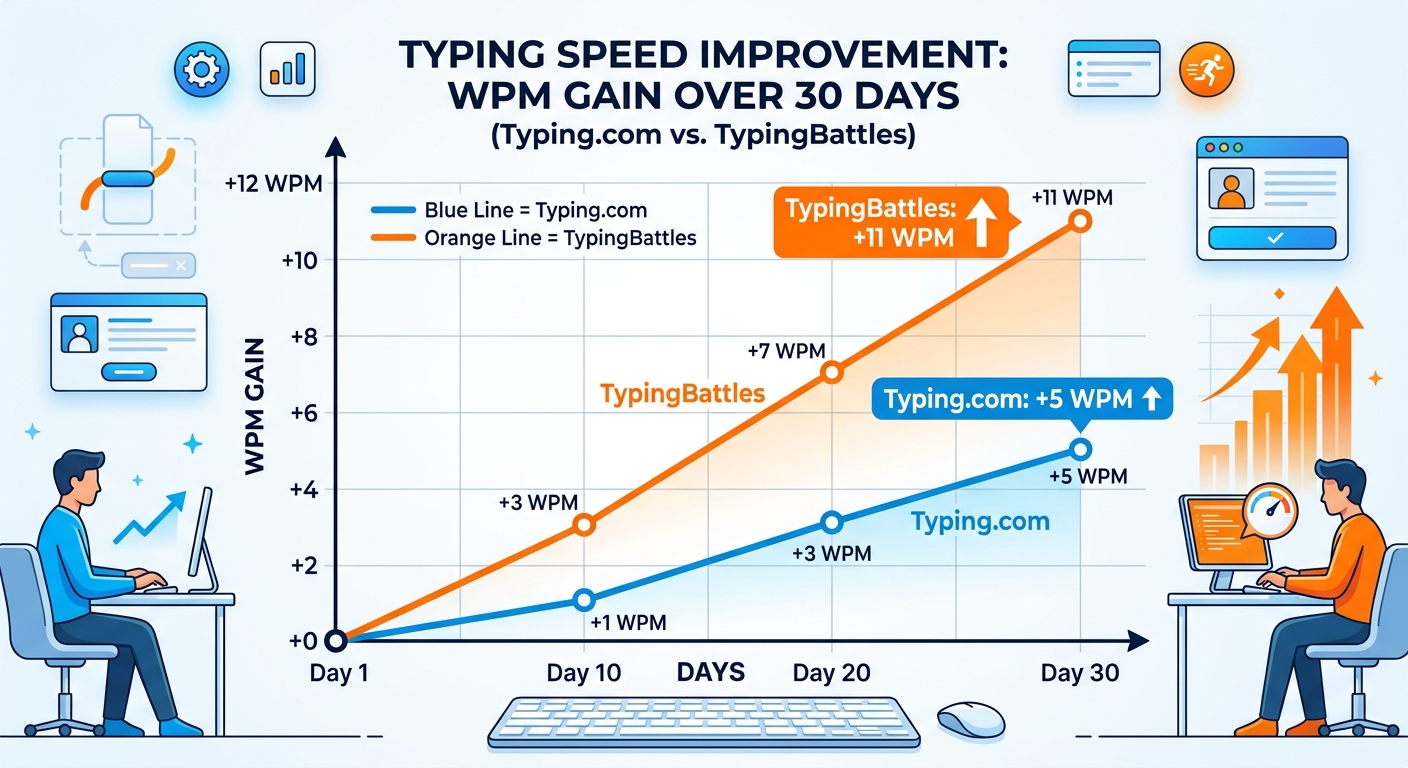
Month 1: Typing.com Only
- Starting WPM: 80
- Ending WPM: 85
- Improvement: +5 WPM
- Accuracy: 95% to 97%
- Sessions: 30 (daily, 15 minutes each)
Typing.com was good for accuracy. The lessons forced me to slow down and type correctly. The digital literacy content was interesting. But the pace was slow, and I found myself wanting to skip ahead to the racing. The ads were a constant irritation.
Month 2: TypingBattles Only
- Starting WPM: 85
- Ending WPM: 96
- Improvement: +11 WPM
- Accuracy: 97% to 98%
- Sessions: 30 (daily, 15 minutes each)
TypingBattles was faster. The live races meant less waiting and more pressure. The lack of ads meant fewer distractions. And the difficulty levels let me control the challenge.
Why the Difference?
Three things.
Competition drives performance. Seeing your opponent's progress bar move is a performance enhancer. It forces you to type faster and cleaner than you would alone.
No friction. TypingBattles gets you into a race faster. Over 15 minutes, that means more races. More races means more practice.
No ads. The absence of ads kept me focused. I didn't realize how much the interruptions were breaking my flow until they were gone.
Who Each Platform Is For
Use Typing.com If:
- You're a teacher or homeschool parent looking for a free, complete curriculum
- You want digital literacy and coding basics alongside typing
- You're a beginner learning from scratch
- You want detailed progress tracking and problem-key analysis
- You're patient and willing to progress through structured lessons
Use TypingBattles If:
- You already know how to type and want to get faster
- You want real-time racing against real people
- You want to perform under pressure
- You want faster matchmaking and less waiting
- You want competition that drives improvement
Use Both If:
- You want the best of both worlds
- You're learning to type and want to apply your skills in races
- You want structured lessons and competitive pressure
My Current Routine
After 30 days on each, here's what I do now.
Warm up on Typing.com. Five minutes of accuracy-focused drills to reinforce proper technique.
Race on TypingBattles. Ten minutes of live races against real opponents.
Cool down on Typing.com. Five minutes of slow, accurate typing to end on a good note.
This combination gives me the best of both platforms. Typing.com provides the structured practice and accuracy training. TypingBattles provides the pressure and competition. Together, they cover both halves of the equation.
The Bottom Line
Typing.com is the best free typing curriculum available. If you're a teacher, a homeschool parent, or a complete beginner, it's the obvious choice. The fact that it includes digital literacy and coding basics is a bonus that no competitor matches.
TypingBattles is the best platform for competitive improvement. If you already know how to type and want to get faster, it's the better pick. The pressure of real races will push you harder than any lesson.
But honestly? You don't have to choose. Learn on Typing.com. Race on TypingBattles. That's the winning combination.
Your fingers will thank you either way.
Key Takeaways
- Typing.com offers a complete free K-12 curriculum with digital literacy and coding basics.
- TypingBattles offers real-time racing against real human opponents.
- Typing.com's free version has ads. TypingBattles is free with no ads.
- Typing.com is for schools and beginners. TypingBattles is for anyone who already types and wants to get faster.
- My 30-day test: TypingBattles drove +11 WPM improvement vs Typing.com's +5 WPM.
- Best approach: Use both. Typing.com to learn. TypingBattles to compete.
Author Bio
Abid is a competitive typist on TypingBattles (105 WPM, 400+ wins). He spent 30 days on Typing.com working through the curriculum before switching to TypingBattles for racing. He still uses Typing.com for accuracy drills. His Typing.com progress is solid. His TypingBattles rank is higher.
Recommendation
Ready to race real opponents? Find out if competition makes you faster.
TypingBattles is free. No account needed. Just click, race, and see where you stand.