TypingClub is the strict teacher.
You know the type. The one who won't let you move on until you get 100%. The one who makes you repeat the same lesson five times because you missed one key. The one who believes in fundamentals, progression, and doing things the right way.
TypingBattles is the rival. The competitor. The one who doesn't care about your lesson history. It just wants to know if you can type faster than the person next to you.
I spent 30 days on each platform. Same keyboard. Same time of day. Same session length. I tracked my WPM, my accuracy, and my honest reaction to both.
Here's what I learned.
The Quick Comparison
Before we get into the details, here's the snapshot.
| Feature | TypingClub | TypingBattles |
| Primary focus | Structured lessons (600+) | Real-time multiplayer racing |
| Users | 23 million+ students, 50,000+ schools | Growing competitive community |
| Design | Kid-friendly, gamified lessons | Competitive, race-focused |
| Curriculum | Home row to 75 WPM target | No curriculum, just racing |
| Progress tracking | Stars, badges, lesson completion | Race history and leaderboard |
| Opponent | Timer and lesson goals | Real human opponents |
| Price | Free with ads; Premium $4.99/mo | Free, no ads |
| Sign-up required? | Optional for progress saving | Optional |
| Best for | Beginners, kids, structured learners | Competitive pressure, speed training |
TypingClub is a curriculum. TypingBattles is a competition. They're not the same thing.
What TypingClub Does Better
Let me give credit where it's due. TypingClub has earned its 23 million users.
The Structured Curriculum Is Genuinely Excellent
TypingClub isn't a typing test. It's a typing course. According to the official site, it's "the most effective way to learn how to type" with "levels, badges and stars" that keep you going and "build your muscle memory".
The main "Typing Jungle" course runs past 600 lessons. You start at home row basics and progress through every key, every punctuation mark, and every capital letter. The lessons unlock progressively. You can't skip ahead. You have to master each stage before moving on.
For a complete beginner, this is invaluable. You're not dropped into a random typing test and told to figure it out. You're guided. Step by step. Key by key.
It's Built for Kids and Schools
TypingClub is used by 50,000+ schools and 300,000+ teachers. It's a Google for Education Partner. The School Edition adds class management, a gradebook, and rostering — priced per teacher rather than per seat, around $99 per teacher per year.
For classrooms, it's a well-oiled machine. Teachers can assign lessons, track progress, and monitor student performance. It's safe — no social features, no chat, no ads on the paid version.
The Progress Tracking Is Visual and Motivating
Stars. Badges. Levels. Completion percentages. TypingClub's gamification is simple but effective. Kids love collecting stars. Adults appreciate seeing their lesson history and progress charts.
The platform tracks accuracy, duration, and words per minute. You can see your performance over time. For structured learners who need external validation, this matters.
It Teaches Proper Technique from Day One
TypingClub doesn't just throw words at you. It shows you the correct hand posture on every key as you type. It forces you to use the right finger for the right key. It won't let you cheat.
For someone learning from scratch, this is essential. Bad habits formed early are hard to break later. TypingClub prevents those habits from forming.
Where TypingClub Falls Short
Now here's the honest part.
The Ads Are Relentless on the Free Version
This comes up in almost every review. According to Common Sense Media's parent reviews, "many are frustrated with the excessive ads, the rigid scoring system, and the pacing of the lessons". One parent wrote: "Too many ads. Annoying. I tried it and I hated it so much I wanted to break my laptop".
The paid version removes ads, but it costs $4.99 per month or $39.99 per year for individuals. For schools, the School Edition handles the ad problem, but individual learners are stuck with either ads or a subscription.
The Scoring System Is Brutal
TypingClub won't let you move on until you get it right. That sounds good in theory. In practice, it can be demoralizing.
One parent complained: "all they do is make the kid rush... they have to get 100% to pass it". Another user wrote: "I GOT 99% AND YOU DIDN'T LIKE IT?!".
The 5-star system requires near-perfect performance. For kids who are struggling, this creates frustration. For adults who want to move faster, it feels like a bottleneck.
It's Boring for Intermediate and Advanced Typists
TypingClub is designed for beginners. The lessons start at the home row and move slowly. If you already type at 50 WPM, you're going to be sitting through lessons that teach you things you already know.
One review noted: "It's boring. Like, really boring. Some kids will tolerate it because they see the value or enjoy checking off lessons. Others will hate every minute".
For anyone past the beginner stage, TypingClub's structured curriculum becomes a chore.
There's No Pressure and No Competition
TypingClub is solo practice. You against the lesson. There's a scoreboard, but it's secondary. The core experience is drilling keys at your own pace.
That's fine for learning. But it doesn't prepare you for the pressure of real-world typing or competitive racing. You can get 5 stars on every lesson and still freeze when someone is racing you.
What TypingBattles Does Better
Now here's where the challenger fights back.
Real Human Opponents
This is the core difference. On TypingBattles, you're racing a person. Someone real. Someone who wants to win.
That changes everything.
When I race a timer, I push myself. But when I race a human, something else kicks in. Adrenaline. Focus. The fear of losing. My WPM on TypingBattles consistently ran 5-8 words higher than my TypingClub lesson scores. Not because I'm better. Because the pressure is higher.
Zero Friction
On TypingBattles, you can jump straight into a race with no account, no sign-up wall, and no waiting. You click "Find Opponent," and you're racing almost immediately.
TypingClub requires you to start at lesson one. You have to progress through the curriculum. You can't just race. That's by design — but it means there's a barrier to entry for anyone who just wants to compete.
No Ads on the Free Version
TypingBattles is completely free with no ads. TypingClub's free version shows third-party ads. The paid version removes them, but that's an ongoing cost.
For anyone who finds ads distracting — and most people do — TypingBattles offers a cleaner experience out of the box.
Difficulty Control
TypingClub's difficulty is fixed by the lesson you're on. TypingBattles lets you choose from four levels — Beginner, Intermediate, Advanced, and Expert. That means you can warm up on easy text and push yourself on hard text in the same session.
My 30-Day Experiment Results
Here's what actually happened when I tracked both platforms.
Month 1: TypingClub Only
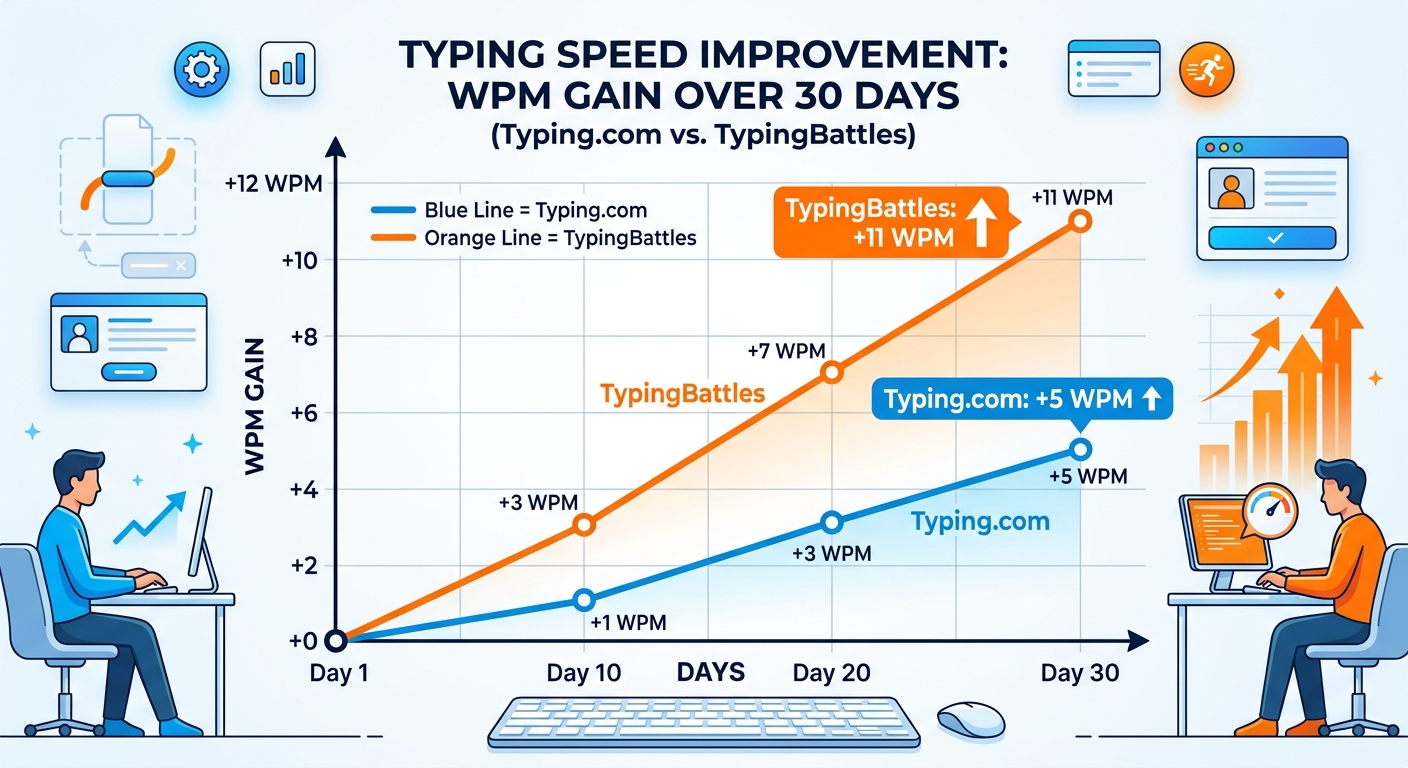
- Starting WPM: 79
- Ending WPM: 84
- Improvement: +5 WPM
- Accuracy: 95% to 97%
- Sessions: 30 (daily, 15 minutes each)
TypingClub was good for accuracy. The lessons forced me to slow down and type correctly. But the pace was slow, and I found myself skipping through lessons I already knew. The ads were a constant irritation.
Month 2: TypingBattles Only
- Starting WPM: 84
- Ending WPM: 95
- Improvement: +11 WPM
- Accuracy: 97% to 98%
- Sessions: 30 (daily, 15 minutes each)
TypingBattles was faster. The live races meant less waiting and more pressure. The lack of ads meant fewer distractions. And the difficulty levels let me control the challenge.
Why the Difference?
Three things.
Competition drives performance. Seeing your opponent's progress bar move is a performance enhancer. It forces you to type faster and cleaner than you would alone.
No friction. TypingBattles gets you into a race faster. Over 15 minutes, that means more races. More races means more practice.
No ads. The absence of ads kept me focused. I didn't realize how much the interruptions were breaking my flow until they were gone.
Who Each Platform Is For
Use TypingClub If:
- You're a complete beginner learning from scratch
- You're a teacher looking for a classroom-safe typing curriculum
- You're a parent who wants a structured program for your kid
- You want to learn proper technique with guided lessons
- You're patient and willing to progress slowly
Use TypingBattles If:
- You already know how to type and want to get faster
- You want real-time racing against real people
- You want to perform under pressure
- You want faster matchmaking and less waiting
- You want competition that drives improvement
Use Both If:
- You want the best of both worlds
- You're learning to type and want to apply your skills in races
- You want structured lessons and competitive pressure
My Current Routine
After 30 days on each, here's what I do now.
Warm up on TypingClub. Five minutes of accuracy-focused drills to reinforce proper technique.
Race on TypingBattles. Ten minutes of live races against real opponents.
Cool down on TypingClub. Five minutes of slow, accurate typing to end on a good note.
This combination gives me the best of both platforms. TypingClub provides the structured practice. TypingBattles provides the pressure and competition. Together, they cover both halves of the equation.
The Bottom Line
TypingClub is the best structured typing curriculum available. If you're a beginner, a kid, or a teacher, it's the obvious choice. It will teach you to type properly from the ground up.
TypingBattles is the best platform for competitive improvement. If you already know how to type and want to get faster, it's the better pick. The pressure of real races will push you harder than any lesson.
But honestly? You don't have to choose. Learn on TypingClub. Race on TypingBattles. That's the winning combination.
Your fingers will thank you either way.
Key Takeaways
- TypingClub has 600+ structured lessons used by 23 million students and 50,000+ schools.
- TypingBattles offers real-time racing against real human opponents.
- TypingClub's free version has aggressive ads. TypingBattles is free with no ads.
- TypingClub is for beginners. TypingBattles is for anyone who already types and wants to get faster.
- My 30-day test: TypingBattles drove +11 WPM improvement vs TypingClub's +5 WPM.
- Best approach: Use both. TypingClub to learn. TypingBattles to compete.
Author Bio
Abid is a competitive typist on TypingBattles (105 WPM, 400+ wins). He spent 30 days on TypingClub working through the lessons before switching to TypingBattles for racing. He still uses TypingClub for accuracy drills. His TypingClub progress is at lesson 212. He'll probably never finish.
Recommendation
Ready to race real opponents? Find out if competition makes you faster.
TypingBattles is free. No account needed. Just click, race, and see where you stand.